End-to-End PDF Processing System for Office Work
Learn how to implement a complete end-to-end PDF processing system for office work. This step-by-step guide covers everything from document creation and scanning to organization, optimization, security, and seamless distribution — helping teams eliminate chaos, reduce file sizes, and boost productivity with a structured PDF workflow
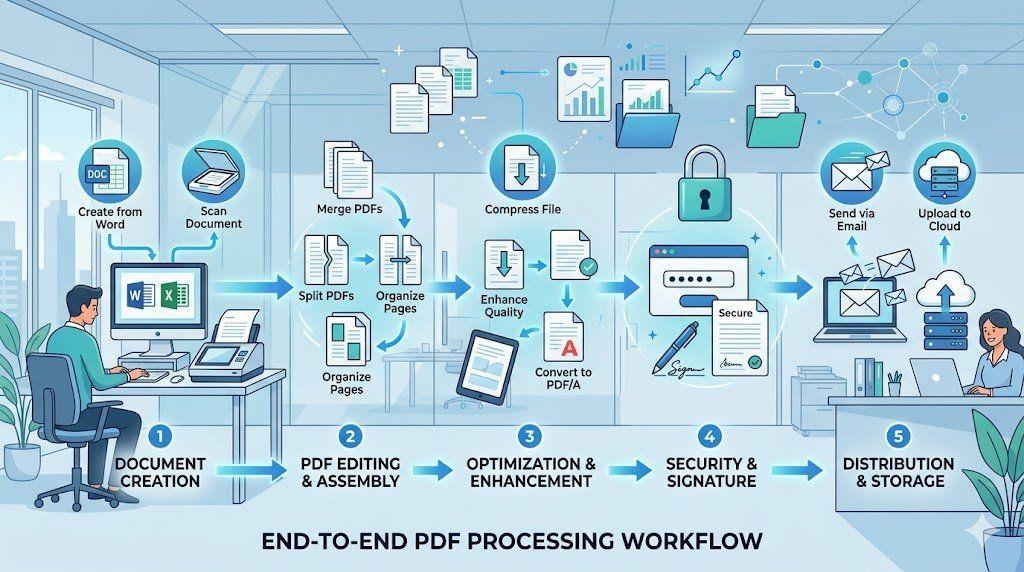
PDF files are one of the most integral aspects of any office workflow. Starting from official contracts to invoices, reports and more. Every team relies on PDFs because of the consistent format and seamless readability across all platforms.
But handling so many PDFs is never simple. If you are handling massive volumes of files daily without any structured system, chances are things can get really messy in no time. Some documents might get duplicated, while some may be lost amidst countless copies.
This is why businesses use a structured PDF processing system for office work. A clear workflow helps teams create, organise, optimise, secure, and distribute documents smoothly. It also improves productivity and keeps everyday office communication more organised and manageable. Let’s learn more about it.
What is a PDF Processing System in Office Work?
A PDF processing system for office work is a step-by-step method businesses use to handle documents from start to finish. It covers everything from creating files and organising pages to compressing, securing, storing, and sharing documents.
In most workplaces today, PDFs are used in almost every department.
Starting from the HR teams that manage employee forms to the finance departments that handle the invoices, and managers who review PDF reports regularly.
A structured PDF workflow system helps all these departments follow a consistent process instead of managing files randomly.
Without a proper workflow, offices often face common problems like:
- Confusing file versions
- Duplicate documents
- Large files that cannot be emailed
- Missing pages
- Poor organization
- Security concerns
This is why many companies now depend on a clear digital PDF processing workflow to keep documents organised and accessible.
A proper system also supports smoother digital workflow management, especially when multiple teams work on the same files.
Stage 1 – Document Creation & Input
Every document workflow begins with file creation or file collection. This is the first stage of a PDF processing system for office work.
The goal here is simple: bring all documents into one organised digital system.
Workflow Steps
Creating a PDF from Word or Excel
Most office documents start in editable formats like Word documents or spreadsheets.
Teams usually create the following files:
- Reports
- Project plans
- Invoices
- Meeting notes
- Financial sheets
- Internal forms
Once the content is finalised, it’s time to convert it into PDFs for easier sharing and better formatting consistency.
Scanning physical documents
Even today, many offices still handle paper files.
These may include:
- Signed contracts
- Printed applications
- Approval forms
- Receipts
- Identity records
Scanning these papers effectively converts different kinds of physical documents into digital files that are much easier to store and retrieve later.
Uploading files into the system
After documents are created or scanned, they are uploaded into the company’s office document management PDF workflow.
Files are usually sorted based on:
- Department
- Client name
- Project
- Date
- Document type
This step helps maintain smoother enterprise document handling across teams.
Stage 2 – Document Organisation & Structuring
Once files enter the system, they need to be arranged properly. This stage focuses on organising documents so they are easier to manage, review, and share.
A strong PDF file management process makes everyday office work much more efficient.
Workflow Steps
Merging multiple documents
Businesses often combine related documents into one file.
For example:
- Monthly reports
- Client presentations
- Employee onboarding documents
- Financial summaries
Keeping everything together makes the document easier to manage and share.
Splitting large files
Some PDFs become too large or contain unnecessary sections.
In such cases, teams usually split files into smaller sections, like:
- Separate chapters
- Department-specific pages
- Individual client records
- Confidential sections
This improves overall PDF organisation and reduces confusion.
Reordering pages
Pages are then arranged in the correct sequence.
Usually, files are carefully organised with:
- Cover pages first
- Main content next
- Supporting documents after that
- Signature pages at the end
This creates cleaner and more reliable structured file processing.
Stage 3 – Document Optimisation
Large PDFs can slow down office work. They take longer to upload, consume more storage space, and are harder to share through email systems.
This is where optimisation becomes important.
A proper PDF optimisation and sharing system helps improve document performance without affecting usability.
Workflow Steps
Compressing file size
Large PDFs are compressed to make them smaller and easier to share.
This is especially useful for:
- Email attachments
- Shared drives
- Cloud uploads
- Remote collaboration
Smaller files move faster through office systems.
Removing unnecessary pages or images
Extra pages and duplicate images increase file size unnecessarily.
Removing unused content helps keep documents cleaner and lighter.
Optimising scanned documents
Scanned PDFs are often bulky and unclear.
Optimisation improves:
- Readability
- File loading speed
- Storage efficiency
- Sharing performance
This stage supports a more reliable office productivity system.
Stage 4 – Security & Compliance
Office documents often contain confidential information. This may include employee records, financial data, legal documents, or internal reports.
That is why security is a major part of every PDF processing system for office work.
Workflow Steps
Password protection
Sensitive files are protected before sharing.
This is commonly done for:
- Contracts
- Financial records
- Payroll files
- Internal business documents
Permission control
Permission settings help limit the access users have to the file. This is truly important.
Restrictions may include:
- Editing
- Printing
- Copying
- Sharing
This ensures that your teams only have controlled document access. This reduces potential mismanagement of PDF files.
Metadata handling
PDFs often contain hidden information, such as:
- Author names
- Creation dates
- Edit history
- Device details
Cleaning any unnecessary metadata is the best way to maintain adequate privacy and security.
Stage 5 – Output & Distribution
After processing is complete, documents move into the final delivery stage.
This step focuses on exporting and sharing finalised files.
Workflow Steps
Exporting final PDF versions
Completed files are then carefully prepared for storage or external communication.
Final versions are usually reviewed before distribution.
Converting formats
Sometimes documents need to be converted into different editable formats, such as:
- Word files
- Excel sheets
- Presentation formats
This improves overall compatibility across different teams and systems seamlessly.
Sharing via email or cloud systems
Final documents are shared through:
- Email platforms
- Internal systems
- Shared drives
- Cloud storage
This supports smoother teamwork and communication.
Complete Office PDF Workflow (End-to-End System)
A proper end-to-end PDF workflow for office work follows a clear sequence from beginning to end.
Step 1: Document creation or upload
Files are created digitally from a doc format or scanned from physical paperwork.
Step 2: Organisation and structuring
Documents are then merged, split, arranged, and categorised as per the requirements.
Step 3: Optimisation and compression
Files are compressed and cleaned for smoother performance and better navigation.
Step 4: Security application
Passwords, permissions, and protection settings are applied.
Step 5: Final export and distribution
Documents are exported, stored, or shared with teams and clients.
This complete PDF lifecycle management system effectively helps businesses maintain consistency across daily operations.
Common Mistakes in Office PDF Processing
Even organised offices sometimes make mistakes during document handling.
Avoiding these problems improves the overall office file organisation workflow.
Skipping file optimisation stage
Large files gradually slow down sharing and consume way more unnecessary storage space in your system.
Poor file naming structure
Unclear file names make documents difficult to locate later.
Over-compressing documents
Too much compression may reduce readability and image quality.
Ignoring security settings
Any unprotected files can quickly increase the chances of unauthorised access.
Lack of workflow standardisation
Different teams using different methods often create confusion and inconsistency in an organisation.
A standardised file lifecycle system effectively creates smoother collaboration between departments.
Benefits of a Structured PDF Workflow System
A proper PDF workflow system makes office document handling faster and more organised.
Faster document processing
Structured workflows reduce delays and improve efficiency.
Reduced file errors
Better organisation minimises duplication and missing pages.
Better team collaboration
Teams can access and share documents more easily.
Improved storage efficiency
Optimised files consume less storage space.
Standardised office documentation
Consistent workflows help maintain uniform document quality across departments.
A reliable, complete PDF file handling system in workplace environments helps businesses improve communication, organisation, and overall workflow efficiency.
FAQ
Q1: What is a PDF processing system for office work?
A PDF processing system for office work is a structured method businesses use to create, organise, optimise, secure, and distribute documents. A proper office PDF workflow system improves document management in companies and supports a smoother digital PDF handling process.
Q2: Why is a structured PDF workflow important for offices?
A proper PDF file management process in the office helps businesses organise documents more efficiently. A structured business document workflow system also improves collaboration and supports a smoother enterprise PDF handling system with a better office file organisation workflow.
Q3: Why do offices optimise PDF documents?
A proper PDF optimisation and compression workflow helps reduce storage usage and improve sharing speed. Businesses often reduce PDF file size to maintain a cleaner document size management system and improve the overall PDF performance.
Q4: How do offices keep PDF files secure?
A secure secure pdf document workflow office process includes password protection, permission settings, and metadata management. A reliable PDF security and compliance system strengthens the overall business document protection process and improves the office file access control system.
Q5: What does an end-to-end PDF workflow include?
An end-to-end PDF workflow system includes document creation, organisation, optimisation, security, and final distribution. This complete document lifecycle management approach supports a smoother office digital document processing flow and improves the overall corporate PDF handling structure.
Conclusion
A structured PDF processing system for office work is the best way for businesses to handle documents in a more organised and efficient way. From document creation and organisation to optimisation, security, and final sharing, every stage plays an important role in smooth office operations.
A reliable PDF workflow system reduces any kind of file confusion, improves collaboration, and helps teams manage documents more effectively. As offices continue moving toward more digital operations, having a clear and organised office document management pdf process is supremely important. A well-planned workflow not only improves productivity but also makes everyday document handling simpler, faster, and far less stressful for teams.
Related Articles
10 Best Free PDF Tools in 2026 – Features, Pros, Cons
Velapdf tops the list of the best free PDF tools in 2026. It offers core PDF tools in one platform — edit, convert, compress, merge, split — without login or watermarks. Fast, simple, and beginner-friendly with 55+ tools."
How to Convert PDF to Word Online Free Without Losing Formatting
Learn how to convert PDF to Word online free without losing formatting using VelaPDF. Preserve tables, fonts, layouts, and images instantly with accurate DOCX conversion and no sign-up required.
Related Tools
Ready to optimize your PDFs?
Experience the world's fastest PDF tools today.